High-end 3D website

Universal Granites: a high-end 3D website where every piece can be configured and quoted

A granite workshop sells pieces made to order, in stones and finishes that no single photo can show.

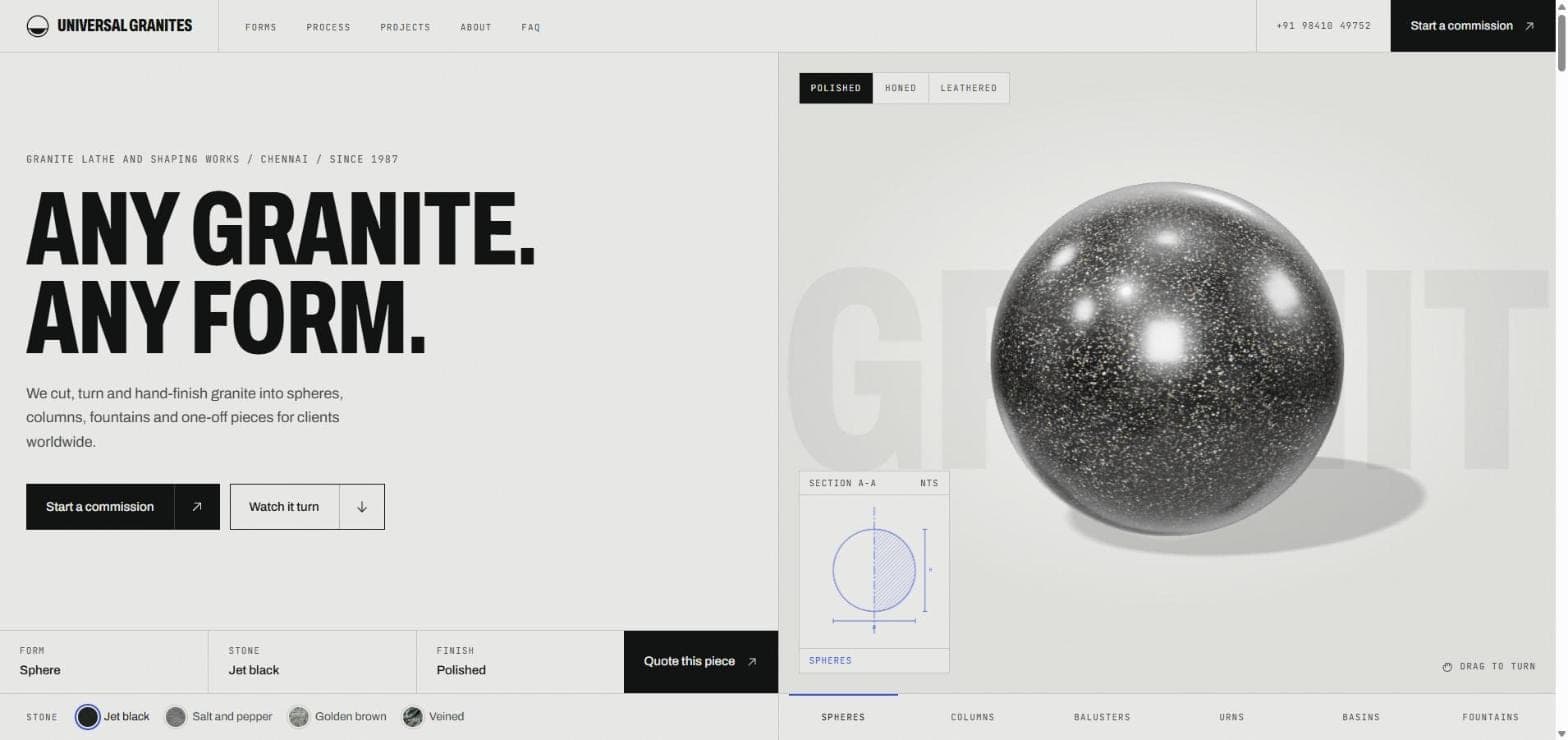
Universal Granites home page with the headline Any granite. Any form. beside a live 3D jet black granite sphere, finish buttons for polished, honed and leathered, a section drawing and stone swatches
Built for
A Chennai granite workshop turning stone since 1987
Signature feature
Live 3D configurator: 6 forms, 4 granites, 3 finishes
Lead path
Quote this piece pre-fills the commission form

The problem in the real world

Universal Granites turns granite into spheres, columns, balusters, urns, basins and fountains, mostly to drawing. It works for architects, landscape designers, hotels, temples, civic bodies and developers, on projects in India and abroad.

Stone is bought on colour, grain and finish. A photo shows one form in one stone, so a buyer weighing four granites and three finishes has to imagine the rest, and a workshop that has been turning granite since 1987 ends up looking like any other supplier.

A first enquiry without sizes or quantity also means another round of messages before anyone can quote. The site had to look as considered as the work, and make that first message a useful one.

The hard part

A 3D configurator that shows the buyer's own piece

The rule: A visitor should see the piece they have in mind, in their stone and finish, before they ask for a price.

Edge cases

  • Six forms, four granites and three finishes make 72 combinations, far too many to photograph.
  • Granite is chosen on grain and colour, so a flat colour swatch on a generic model would mislead.
  • On a phone, turning the model with a finger must not stop the visitor scrolling the page.

How it is handled

The hero is a live WebGL scene. Stone swatches wrap photographed granite onto the model, the finish buttons switch between polished, honed and leathered, and dragging turns the piece. The canvas leaves vertical swipes to the page, so turning a piece on a phone never traps the visitor. A section drawing beside the model redraws its profile as the form changes.

What the visitor controls

  • Form

    Choices on the live site
    Spheres, columns, balusters, urns, basins, fountains
    What changes
    The turned profile and its section drawing
  • Stone

    Choices on the live site
    Jet black, salt and pepper, golden brown, veined
    What changes
    The photographed granite on the model
  • Finish

    Choices on the live site
    Polished, honed, leathered
    What changes
    How the surface takes the light
  • Drag

    Choices on the live site
    Turn the piece by hand
    What changes
    The viewing angle
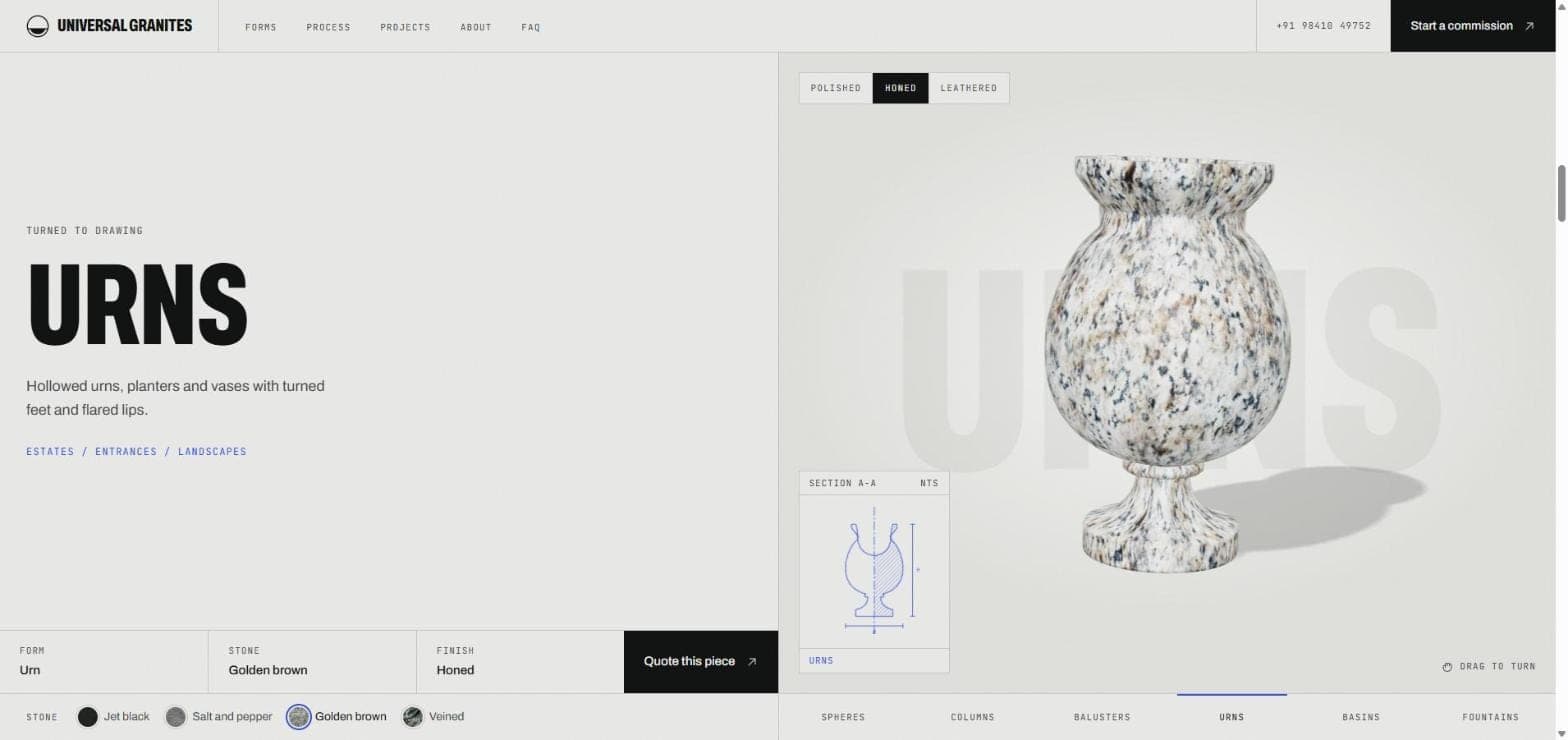
Universal Granites configurator showing an urn in golden brown granite with a honed finish, the urn's section drawing, and the form, stone and finish summary beside a Quote this piece button
Screen from the live site.

A catalogue told through scroll, not six identical cards

The rule: Scrolling through the forms should feel like watching one block turned into the next piece.

Edge cases

  • A list of six forms usually becomes six cards that look the same.
  • The heading, description and drawing have to stay in step with the model mid-transition.
  • A visitor who has already chosen a stone and finish should not lose that choice on the next form.

How it is handled

The forms section pins to the screen while the visitor scrolls. Scroll progress moves the model from one turned profile to the next, and the heading, description, typical uses and section drawing follow it. The chosen granite and finish carry across every form, and the tab bar underlines where the visitor is. The renderer is told about the visitor's reduced-motion setting when it starts.

One scroll through the forms

  1. The section pins

    The forms scene holds while the visitor scrolls.

  2. Scroll turns the model

    Sphere, column, baluster, urn, basin, fountain.

  3. Copy follows the model

    Heading, description and typical uses change with each form.

  4. The drawing redraws

    Section A-A traces the profile on screen.

  5. Stone and finish carry over

    The visitor's choice stays on every form.

  6. Tabs mark the place

    The active form is underlined in the tab bar.

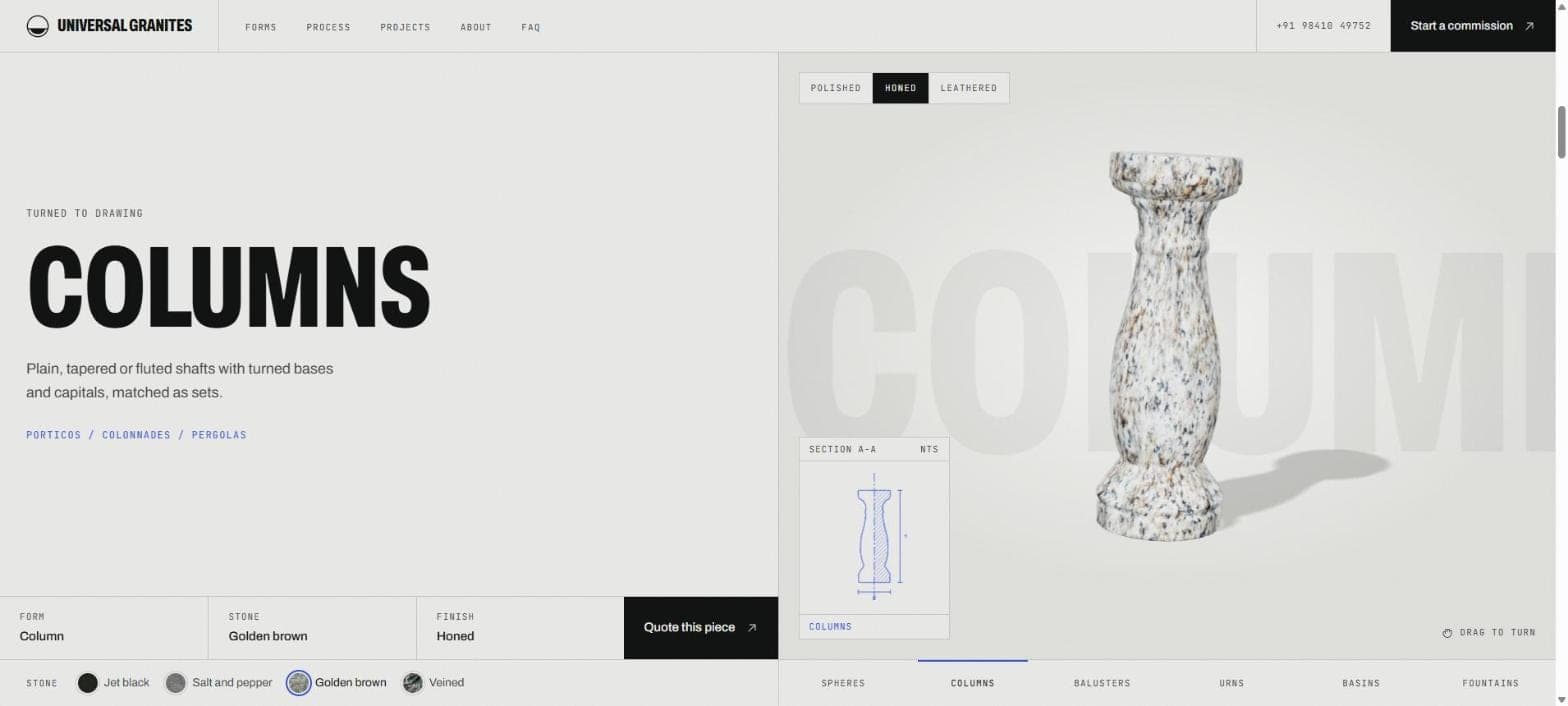
Universal Granites forms section pinned on Columns, with a turned granite column in golden brown, its section drawing and the tab bar underlining Columns
Screen from the live site.

Heavy visuals, light first load

The rule: The 3D scene must never be the reason the page is slow to appear or fails to appear at all.

Edge cases

  • A WebGL renderer and stone textures weigh far more than the words a visitor and a search engine read first.
  • Some devices and browsers have no WebGL at all.
  • The headline, copy and the route to an enquiry have to work before, and without, the 3D.

How it is handled

Pages are rendered on the server, so headings, copy, contact details and structured data are in the first response. In the browser the site checks for WebGL first, and only if it is there downloads the stone renderer as a separate chunk, followed by four photographed granite textures. Without WebGL the 3D code is never fetched, and the copy and the commission form do not depend on it.

What loads when

  • Server response

    What arrives
    Headings, copy, contact details and structured data
    Needs WebGL
    No
  • Page scripts

    What arrives
    Swatches, finish buttons, form tabs and the commission form
    Needs WebGL
    No
  • After a WebGL check

    What arrives
    The stone renderer and four granite textures
    Needs WebGL
    Yes

Every interaction ends at a useful enquiry

The rule: Whatever the visitor has configured should arrive in the enquiry without being typed again.

Edge cases

  • A visitor who has picked an urn in honed golden brown should not have to describe it from scratch.
  • A workshop quotes from sizes, quantity and finish, so those have to be asked for up front.
  • Some buyers would rather use WhatsApp, a phone call or email than a form.

How it is handled

Quote this piece takes the visitor to the commission form with the form type already selected and the message pre-filled, for example "Urn in golden brown granite, honed finish.", followed by blank lines for size and quantity. Send enquiry opens the visitor's own email app with everything filled in, and WhatsApp, telephone and email sit beside the form. Start a commission stays in the header on every screen.

From configurator to enquiry

  1. Pick form, stone and finish

    On the 3D model, in the hero or the forms scene.

  2. Tap Quote this piece

    One button under the model.

  3. Form type is selected

    The matching piece is ticked in the commission form.

  4. Message is pre-filled

    Form, stone and finish written out, with lines for size and quantity.

  5. Visitor adds size and quantity

    The two details a quote depends on.

  6. Send enquiry

    Opens the visitor's email app, filled in.

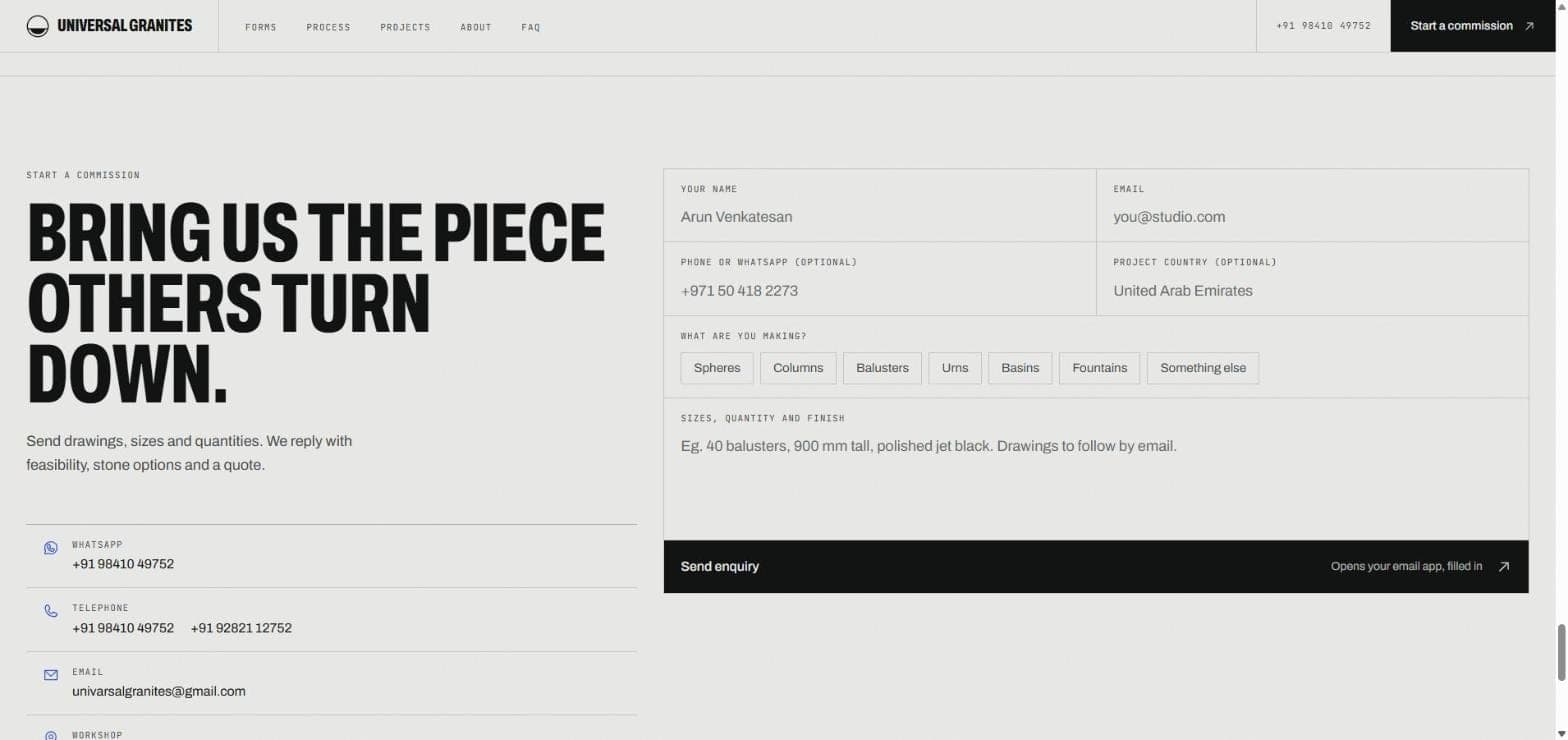
Universal Granites commission form with fields for name, email, phone or WhatsApp and project country, form type buttons, a sizes and quantity box and a Send enquiry button, beside WhatsApp, telephone and email details
Screen from the live site.

How it fits together

  • Workshop content

    Forms, process, projects, FAQ

  • Granite textures

    Four photographed stones

  • Visitor choices

    Form, stone, finish, scroll and drag

Universal Granites

  • WebGL stone renderer
  • Scroll-driven forms scene
  • Section drawing
  • Commission form
  • Pre-filled enquiry

    Opens in the visitor's email app

  • WhatsApp, phone and email

    Beside the commission form

  • Search and AI answers

    Organisation, local business and FAQ markup

What this means for your business

  • Show the product, not a stock photo

    When a product is made to order, an interactive 3D model answers the buyer's first question, what will mine look like, before they write to you. The same approach suits furniture, lighting, fixtures, jewellery and anything sold in variants.

  • Premium feel without a slow page

    Motion and 3D load after the content, and only on devices that can run them, so visitors and search engines get the words first and the visuals follow. A high-end site should never trade being found for looking good.

  • Every effect leads to an enquiry

    Configurators, scroll scenes and galleries are worth building only if they end at a lead. Here the visitor's 3D choice becomes the first line of their enquiry, which is the pattern we bring to every premium site.

Questions about Universal Granites

What makes this a high-end website rather than a template?

It is built around the client's product. The hero is a live 3D model that visitors configure by form, stone and finish, the forms section is a scroll-driven scene with a section drawing that redraws as the shape changes, and the quote button carries the chosen piece into the enquiry.

Do 3D and animation slow a website down or hurt SEO?

They do not have to. Here the page is rendered on the server, so headings, copy and structured data arrive first and search engines can read them without running any 3D. The renderer downloads separately, and only on devices that support WebGL.

Can you build a 3D configurator for our products?

If the product can be modelled, yes. On this site six turned forms, four granites and three finishes are combined live in the browser. Furniture, lighting, fixtures and other made-to-order products follow the same idea. Every engagement starts with a consultation, not a package.

How does a project start?

With a consultation, before anything is quoted or designed. We sit with the people doing the work and map what actually happens, and if a system is not the answer we say so. The first consultation is free. A written proposal follows: what to build, in what order, what it costs and what it should remove.

If you build a custom system for us, do we own it?

Yes. You own the system outright. Ongoing support is a choice you make later, not a subscription you are locked into to keep the software running.

Want a website built this carefully? Let's talk.

See what we offer: Premium website design in Chennai.

No cost. Reply within 24 hours. Your details stay confidential.